Friday, May 28, 2021

Sprint #8 Delivery VR Project


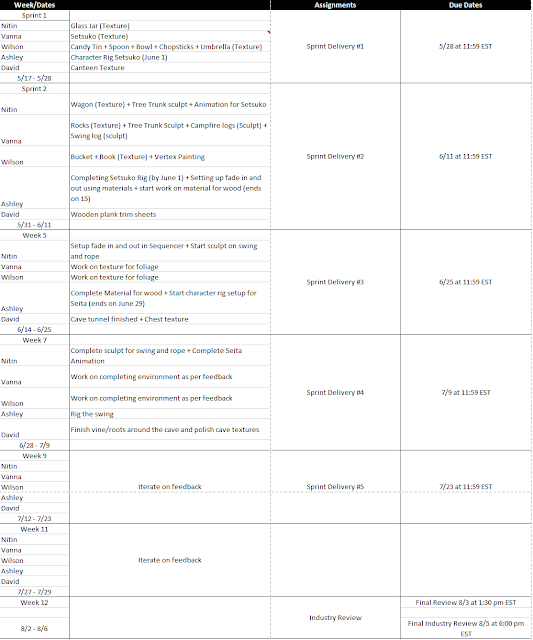
For the start of the new Summer semester, we have been tasked with discussing with out team and planning out the sprints for the remainder of the VR experience project. Initially we created individual deadlines we had established during the first class, but after getting feedback from our teachers, we created a more broader version to follow along with the Sprint deliveries for the class overall.

Personal team deadlines


New sprint schedule

When it comes to my current tasks, I am currently in Zbrush polishing my models and such when it comes to my assets that need to be textured for our current sprint still: Candy Tin, Bowl, Spoon, Chopsticks, and Umbrella. I underestimated how much time it would actually take and am working over this night to catch up on and will post updated pictures of where they are at later.

We it comes to texturing, we will be following this video from Stylized Station and make changes as needed to make sure all our art assets fit together nicely. 
For color choices, out art lead Vanna was able to curate colors for me to follow as a base and tweak as needed to help all the assets match:


Sunday, May 23, 2021

Portfolio Piece 01 - Week 01

Time to start the Summer semester off with the first assignment of 3D Art III. We are now spending class time to create personal portfolio pieces uniquely tailored to our interests and what we want to do. After picking out some choices and getting feedback from Nick Zuccerello, our teacher, I landed on creating a League of Legends fan skin with WINTER WONDER AMUMU:

Main concept art by Noah Warner

Additional references

I am a big fan of Riot Game's League of Legends and in my opinion, they have fine tuned their hand painted art assets to be a staple of the franchise no matter which game in the in-game universe. From what use to be low-poly low res art has become one with more of a style with a personal touch. I was browsing through Google and Artstation and came about this fan concept of Amumu, a champion from the game. Personally I don't play the champion much, but I have always enjoyed the whimsical sad vibes of the character that it has become synonymous for. However, the champion is outdated when it comes to his model, animations, and VFX. One way a champion is able to have some changes is through skins and I feel in this case, even though Amumu has a Christmas theme skin, this one gives him a Cuphead feel while incorporating elements of the holidays. His signature sad face is still present and is a ironic contrast to he warmth and celebratory nature of Christmas.

Since everyone has different projects, we need to have a custom plan of attack to have a finished product in four weeks time. At the moment, we are at week 1, but time is money and we need to get working in order to make best use of time to create a well polished project by the end.

Here is my plan of attack:

Week 1: Block out to high res sculpt
Week 2: Game res/UV, begin texturing (AO/gradients/base color)
Week 3: Texturing and polish, start rigging
Week 4: Posing, final display of work

When it comes to displaying the work, I want to follow more of what I have been seeing when it comes to displaying work for League of Legends. In the case of the characters, there is a big emphasis of having the character be shown on the game's Summoner's Rift map. The reasoning being, is because it's important to get a sense of scale of how the character fits into the game as well with it's surroundings and other champions/assets. I want to also be able to display the champion posed to with effects drawn in to help visualize the skin in action with it's own abilities with the Winter holiday twist. A big inspiration when it comes to the display of the work will come from Yekaterina Bourykina, who happens to also have made my favorite skin in the game: Spirit Blossom Ahri.

Week 1 Progress Check:

Even though we are free to set our own pace and schedule for this piece during the allotted time frame, I was very eager to get started with it as a dream company of mine is Riot Games and I want to create art of League of Legends. To start, I began with a simple blockout inside of Zbrush:

Zbrush Blockout
Following that, I began to sculpt in more of the shape of the head as it is the signature part of the skin as well the character. It was important for me to make sure to have Amumu's sad boy face showing on the piece. Looking at Amumu's base official model. Riot didn't put enough emphasis on that aspect, and as such I feel skin's should compensate for that and show Amumu's true spirit. Following that, I sculpted on the lower half with the main body, slippers, and hands:

Zbrush Sculpt as of Week 1
When it comes to my week 1 progress, I am pretty satisfied, although I slightly missed the mark by not have the Christmas lights sculpted in. As I only spent the weekend working on it, it is evident if I spend weekdays as well, I can easily make my plan. For the following week, in addition to what I need to accomplish for week 2, I need to polish to my Zbrush sculpt and add in the Christmas lights. As a side note: I did a rough paintover to help me better understand how to have the lights wrap around Amumu as the concept art boggled my mind and felt weird:
Front and back of the block out to help me better visualize the lights


Monday, April 26, 2021

Module 4 - Environment or Vehicle Part 03

 This is the final week when it comes to our collaborative environment piece. For this week, I was able to figure out how to export the texture maps from Substance Designer successfully with making the sRGB work as intended. Apparently exporting as a linear color source and then ticking sRGB in the texture's settings in UE4 allowed for the colors to be like how it is in Designer. I also ran into an issue when it came to the lighter colors; lighting will be important in making sure the materials come out well. 

As for the actual materials, I was able to set up vertex painting finally. In order to tile the textures, I had to add texture coordinates in the material editor to tile the different texture maps. Going forth, I need to fix up how much to tile for the type of material and paint the island nicer.


Sample of vertex painting

Friday, April 23, 2021

VR Sprint 7 Delivery

 For the final sprint of the semester, I focused primarily on making sure the ground foliage was up to standard and made sure to bring all of the various ground foliage together. Below you can see the final placement of them as well as some pebbles and making objects were in proper positions. I made sure to follow the flow of the original reference scenes even though our play space is obviously smaller.


 Before doing all those things above, I also went back to fix up on the 2D grass blades as well as make an additional grass card made in the prior sprint. I focused on bending up the shape of the cards a bit as well as add a linear gradient on the wind node of the material to allow for the bottom of the grass blades to not be swaying around.


I also worked on fixing the 3D bush grass that Nitin made as well the various 3D flowers made by David and Vanna. Because of the way the UVs are laid out, a linear gradient would not be able to help mask out the wind affect and as such it would mask different parts of the foliage. In order to fix this, I made a new material for 3D foliage and made use of the green vertex color channel and exported the meshes and in Maya vertex painted black for the areas to be masked out and green for the areas that needed to be having motion.


The final key thing I worked on this sprint was create a last couple proxies we had missed in prior sprints for set dressing the cave chest. Below you can see two things I proxied, a book and a glass bottle.


All in all, me and the whole team are pretty satisfied with where we are at the moment with the VR experience and can't wait to see what the Summer semester brings.


Monday, April 19, 2021

Module 4 - Environment or Vehicle Part 02

 Following with Spring break, we have no resumed our classes and this is technically our second week with working on our collaborative environment assignment. Last time, I created a base stylized sand texture I followed a Udemy tutorial by Jose Moreno. This week, I expanded on it by taking heed from Nick Zuccarello's advice on setting up for the vertex painting to create a varied environment when it comes to tiling textures. 


Following the above picture, I have created the following materials to represent them below.

Wet Sand

Rock + Sand

Sand + Rock

Sand


Outside of that, I have imported them into the UE4 project with a main material and created multiple instances to house the various texture maps for the different materials I have created. For the following week, I will be implementing the materials through vertex paint to retexture the sand on the environment. I will also make sure to adjust my pebble colors to reflect the colors used by my teammate Crissy Peters as she worked on the actual rock meshes that will placed around the map.

Monday, April 5, 2021

Module 4 - Environment or Vehicle Part 01

 For this new module, we have been separated into separate teams to work on an environment piece that will all be brought together in the end to create an island/ship experience. I have been placed on the island team and tasked with creating three variants of tileable textures for the island sand. I feel that this is a good opportunity for me to work on learning more about Substance Designer as it has been a while since I have last used it. 

As for what I have accomplished this week, I have began looking into a tutorial I have that involves creating stylized textures inside of Substance Designer. Besides going over the basic interface and functions of Substance Designer, it has a category involving creating stylized sand. I was able to follow it and create the following results. 


I think this is a good starting point for creating the tileable sand textures. Now that I have this base version, I can iterate and modify it so that I can create the three different versions that I can use when it comes to vertex painting them onto the island mesh inside of UE4.

VR Sprint 6 Contributions

For this sprint delivery, I was primarily tasked with working on creating the grass for the environment. Nitin had originally had 3D meshes for grass, but there were concerns for performance when it came to being a VR experience. As such, I focused this sprint on using cards to create more animated and lively grass while still being light on performance.

I had first created different painterly style cards when it came to the grass:

However, after consulting out art lead Vanna, she had feedback on making them more simple rather than so detailed and focus on more desaturated hues like a simple yellow rather than just vibrant greens. However before I proceeded to redo the grass cards, I went and looked at the tutorial I was to follow on implementing the grass and decided to only have to create alpha and have the colors be created in the materials editor. As such I was able to create cards with a natural wind affect through a material when it came to the grass blades, cattails, and ferns. After making the main material, I created instances to simplify the process and make it easier to manage. Later, I will need to finesse them when it came to the effect as well as their colors when the time comes.


Research Project

 For my research project, I decided on learning more on about how to create stylized hair in Zbrush as well as focus on creating cleaner sha...